Hugo
Hugo Pipes Revolution
A 2018 blog post explaining Hugo Pipes, the asset-processing pipeline Hugo introduced in v0.43 for bundling, minifying, fingerprinting, and compiling Sass without external build tools.
a nice collection of partials and shortcodes from gethugothemes, available as individual modules
A GitHub repository from Gethugothemes containing over 30 reusable Hugo modules, including media, interactive, and SEO components. Each module is distributed as an individual, drop-in Hugo module.
devnodes image convert guide
A blog post on using Hugo's built-in image processing to convert and serve images as WebP, including a reusable partial template for the resize-and-encode step.
Directory Structure Explained
A 2017 blog post explaining Hugo's directory structure, covering the role of the layouts and static directories and how _index.md files render section list pages.
Gallery Deluxe Theme
Gallery Deluxe is a Hugo module for building photo galleries, built on the Pig.js library and optimized for sites with large image collections. It supports optional image shuffling, EXIF data display, and watermarks.
Gallery Theme
Hugo Theme Gallery is a Hugo theme for photo galleries by Nico Kaiser, using a justified layout and PhotoSwipe for its lightbox. It supports private albums and Open Graph tags for SEO.
hugo official docs all configuration options page
Hugo's official documentation hub for site configuration, covering the config file formats, the settings available, and how configuration is resolved from files, directories, and environment variables.
Hugo Survival Guide
A comprehensive and practical guide to building websites with Hugo — covers templates, layouts, shortcodes, and more.
Markus Wolf Image resource guide
A blog post by Markus A. Wolf on the different Hugo template methods for accessing image resources, covering GetMatch and Match for content-folder images and page-based access via .File.Dir and .File.UniqueID.
Martijn van Vreeden image shortcode
A blog post presenting a Hugo shortcode that serves images in next-gen formats such as WebP using the HTML element, with a fallback to a standard format for unsupported browsers.
PaperMod theme
The installation page for Hugo PaperMod's wiki, covering the theme's four installation methods (git clone, git submodule, direct download, or Hugo modules) and basic configuration.
Photo Swipe plugin
PhotoSwipe is an open-source JavaScript image gallery and lightbox library for mobile and desktop, framework-independent and MIT licensed.
PIG.js progressive image gallery
Pig.js is an open-source JavaScript library that arranges large photo collections into a responsive, progressive-loading grid using CSS transforms, loading and unloading images as the user scrolls.
resource for setting up hugo with tailwindcss
A 2022 blog post walking through adding Tailwind CSS 3 to a Hugo site, covering tailwind.config.js setup and build/watch scripts for compiling styles during development.
Very clean and printable resume theme
An MIT-licensed Hugo theme for a single-page, A4-sized printable resume, generated from YAML content and deployable as a static site or exported to PDF.
Github Action to Create New Content in Hugo
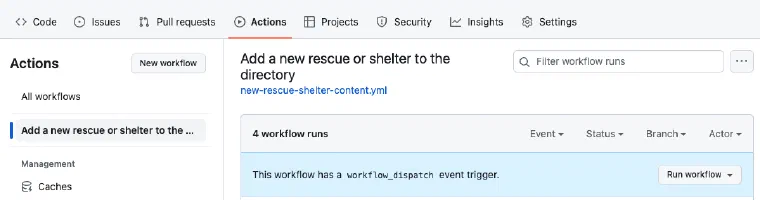
This is what it looks like I use Hugo a lot for my web development work, and I think it is pretty great. The one problem with it for many non-technical people I work with is that there is no CMS feature, they want a website administration page where they can do the usual.
Link Graveyard
The link graveyard is my page for remembering where I found stuff – whether it’s something I learned, something cool I stumbled upon, or maybe just a friend’s site.
Hugo Helpers
Here are some useful partials I use in this theme.
layouts/_default/_markup/render-image.html This replaces the default markup template for rendering an image when the markdown code  is used. It calls another partial you have to add to your theme or layout directory in your site called ImageConverter.